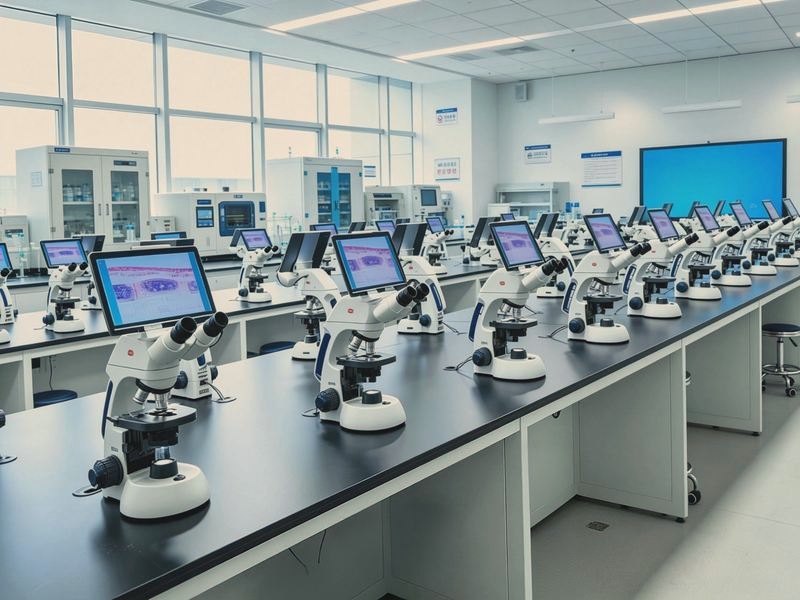
远光瑞业数码显微互动教室
Model: YGR-IMCThe hardest part of a microscopy lab class is not operating the microscope, it is seeing. A teacher demonstrates focusing once at the front bench while thirty students each look down their own eyepieces, and checking who has it and who does not means walking bench by bench. Showing one typical structure to the whole class turns into passing slides around. This classroom solves that: every microscope image goes onto one network.
Overview
The system has three parts. A trinocular digital microscope at the teacher bench, connected to a camera and the lectern screen. One trinocular digital microscope per student, each with its own digital imaging. In between, an interactive teaching software suite on a gigabit local network. The teacher image can be broadcast to every student screen in one click, or any single student image pulled up for discussion. Students can raise a hand for help, capture the current field of view, and submit observation records. Class material distribution, group discussion and screen locking all sit in one interface.
Three tiers match the real intensity of lab teaching. High tier pairs a PA53 BIO trinocular digital microscope at the teacher bench with one Panthera i digital microscope per student, for research-oriented teaching, graduate labs and fine morphological observation. Mid tier uses Panthera S6 at the teacher bench with M200S for students, the mainstream configuration for undergraduate lab courses. Entry tier uses BA310 with M150S, suited to foundation courses and large classes. All three share the same software and network architecture, so upgrades later mean new microscopes, not a new system.
The payoff is measurable: no more walking bench to bench to check focus, one broadcast puts the same field in front of the whole class and the same period covers more content; a student who is stuck can ask for help and the teacher annotates on the shared image without breaking the flow; captured images can be archived, submitted and graded, so lab reports are no longer drawn from memory; shutdown, screen lock and software updates run in batch, cutting lab management workload; and the three tiers let a department with a limited budget build the room first and upgrade machines later.
Delivery includes site survey, bench layout and cabling advice, installation and system commissioning, teacher training, and local after-sales response. A classroom can be configured for 20 to 40 student workstations, and existing microscopes that meet the digital imaging requirement can be partly integrated.
Specifications
| Student workstations | 20-40, sized to class and room |
|---|---|
| Teacher bench | Trinocular digital microscope, digital camera, lectern screen or projector |
| Student bench | One trinocular digital microscope per student, independent digital imaging |
| Software | Teacher control software and student software |
| Network | Gigabit wired LAN, dedicated switch or separate VLAN |
| Teacher functions | Screen broadcast, student image capture, on-image annotation, assignment distribution and collection, screen lock, one-click shutdown |
| Student functions | Live observation, image capture, help request, receive broadcast and assignments |
| Expandable | Digital slide cloud classroom, lecture recording, room display |
| Installation | Cabling guidance, system commissioning, teacher training |
| Service | Local engineer response, software updates included |
Three-tier configuration
| Tier | Teacher bench | Student bench | Typical use |
|---|---|---|---|
| High | PA53 BIO trinocular digital microscope | Panthera i digital microscope, one per student | Research-oriented teaching, graduate labs, fine morphological observation |
| Mid | Panthera S6 trinocular digital microscope | M200S digital microscope, one per student | Mainstream undergraduate lab courses |
| Entry | BA310 trinocular digital microscope | M150S digital microscope, one per student | Foundation courses, large classes |
Features
- One broadcast puts the same field in front of the whole class, no bench-by-bench focus checks
- Pull up any student image for discussion without leaving the lectern
- Students raise a hand and the teacher annotates directly on the shared image
- Captured images can be archived, submitted and graded, lab reports are no longer drawn from memory
- Group discussion, screen lock and assignment handling all sit in one teacher interface
- Shutdown, screen lock and software updates run in batch, lab management gets easier
- All three tiers share one software and network architecture, so a limited budget can still start the room
- Upgrades later mean new microscopes, not a new system
- Both teacher and student benches are trinocular, visual observation and digital imaging work at the same time
- Gigabit wired LAN keeps broadcast smooth without frame drops
- 20 to 40 student workstations, sized to class and room
- Cabling guidance, commissioning and teacher training included, with local engineer response
Applications
- Basic medical and morphological lab courses (histology, pathology, microbiology)
- Botany, zoology and biology microscopy labs
- Medical laboratory and public health inspection programs
- Materials and metallographic structure observation courses
- Open demonstration classes, teaching competitions and recorded model lessons
- Lab exams and practical assessments with image monitoring and archived captures
- Self-directed student observation and project work
- Inter-school teaching exchange and remote class observation
Frequently Asked Questions
Want the full specification sheet?
Leave a number and we will send the specification sheet and a quotation for the 远光瑞业数码显微互动教室.