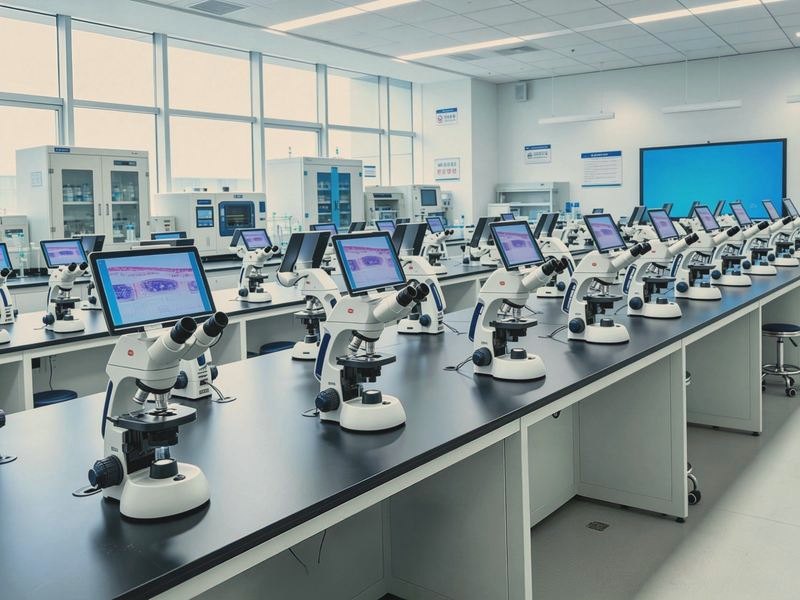
Digital Interactive Microscopy Lab Specifications
1. System composition
• Student station: digital biological or stereo microscope, digital camera and student software
• Teacher station: trinocular microscope, high definition camera and teacher control software
• Network: gigabit switches, server or host, cabling
• Display: projector or large screen at the teacher station, computers or all-in-one units for students
• Ancillary: student benches, laboratory tables, uninterruptible power
2. Student station: the key item
• Microscope: infinity optics with plan achromat objectives 4X, 10X, 40X, 100X
• Camera: 5 megapixels or more, USB 3.0, live frame rate of 25 fps or more
• Student computer: i5 or better, 8 GB memory, solid state drive, gigabit port
• Student software: local preview, capture, recording, electronic hand-raising, receiving broadcast
3. Teacher station
• Teacher microscope: trinocular, allowing simultaneous viewing and capture
• Teacher camera: 12 megapixels or more, for both stills and live images
• Teacher software: broadcast, monitoring, grouping, remote guidance, on-screen annotation
• One-click broadcast and switching between student views, with latency of 1 second or less
4. Network and image transmission
• Gigabit switches with backplane bandwidth for all stations streaming at once
• Stream of 20 Mbps or less per station at 1080P, so 48 stations need dedicated bandwidth planning
• Multicast support, avoiding duplicated bandwidth when the teacher broadcasts
• Student stations keep local preview if the network drops, so the class continues
5. Teaching software functions
• Broadcast of the teacher view to every student screen
• Real-time monitoring of any student field, with rotation between stations
• Group discussion, pushing a selected student view to a selected group
• Electronic hand-raising and voice intercom as an option
• Capture of student images and recording of short lessons
• In-class quizzes, answer statistics and attendance records
• Campus network and academic system integration as an option
6. Workstation count and layout
• Standard configuration of 30 to 48 student stations, plus the teacher station and a spare
• Bench width of 1200 mm or more per station, so microscope and computer sit side by side
• Independent power and network points per station, with cabling in under-bench trunking
• Two spare stations recommended for quick substitution on failure
7. Installation and acceptance
• On-site installation: microscope positioning, camera integration, network commissioning, software deployment
• System integration test: all stations powered at once, checking broadcast, monitoring and recording stability
• Teacher training: at least one on-site session covering routine use and basic troubleshooting
• Acceptance: at least 30 minutes at full load with no disconnection, no stutter and clear images
8. Power and environment
• Power supply AC 220 V, 50 Hz, UPS recommended
• Operating temperature 5 to 40 degrees Celsius, relative humidity up to 80 percent
• Blackout curtains recommended, ambient light affects microscopy
• Anti-static flooring and a separately earthed network cabinet
9. Three points where procurement often goes wrong
• Camera resolution or frame rate too low, so student images stutter and smear and the class cannot proceed
• Software assembled from parts, with unstable broadcast and monitoring dropping out several times in one lesson
• Acceptance limited to switching on, without a full-load test, so problems only appear in a real class